Best GLP-1 appsAndroid

ANDROID GUIDE · UPDATED September 29, 2026

Best GLP-1 Apps for Android (2026)

Five Android apps for different parts of your GLP-1 routine. Compare medication logs, food and protein tracking, Health Connect support and what you can use for free.

Published by GLP AI, one of the apps compared. Based on official features and store listings, not independent hands-on testing. Tracking apps do not replace clinical care.

QUICK PICKS

Which Android app fits your routine

For medication and meals together on Android, start with GLP AI. It combines dose and symptom logs with food tracking, Meal Score feedback and an AI coach. Compare Shotsy for shot history and progress charts, MyFitnessPal for a familiar food diary, Cronometer for nutrient detail, and MyNetDiary for food logging with paid GLP-1 medication tools.

Five Android apps · picks by use case, not a numerical ranking
AppA good fit forPaid features or limitsGet the app
GLP AIMedication and food logs with Meal Score feedbackFull AI coach, Meal Score and medication chartGoogle Play
ShotsyShot history, injection sites and progress chartsAdditional premium tools; check the current offer on your platformGoogle Play
MyFitnessPalA familiar food diary and calorie trackingBarcode Scanner, Meal Scan and additional nutrition controlsGoogle Play
CronometerDetailed nutrition recordsGold adds features; check the current plan comparisonGoogle Play
MyNetDiaryFood database and barcode logging with GLP-1 toolsMedication tracking, Meal Scan and GLP-1 menusGoogle Play

Swipe or scroll the table to compare every column.

Try GLP AI on Android

Free covers tracking, with a limited try of the AI coach, Meal Score, and medication chart. Premium unlocks the full versions.

Get GLP AI on Google Play
WHAT MATTERS ON ANDROID

Health Connect, wearables and Android feature gaps

An Android download does not guarantee the same features as the iPhone version. Check the exact health data, medication type and wearable workflow you plan to use.

  1. 01

    Health Connect is about specific data

    GLP AI’s Google Play listing includes steps, sleep and active energy through Health Connect. MyFitnessPal and Cronometer also document Health Connect connections. Check which records each app reads or writes, grant only the permissions you want, and confirm that a new record appears after connecting.

  2. 02

    Check pills separately from shots

    Shotsy’s product page labels pill tracking as iOS only. If you take an oral medication, confirm Android support before paying. In any tracker, check that you can record your prescribed medication, form and schedule without changing the instructions from your clinician.

  3. 03

    A watch is a separate compatibility check

    MyNetDiary lists Wear OS support. For any app, check what the watch actually lets you log or view. Phone availability, Health Connect integration and a dedicated watch app are different capabilities.

Read the official feature and integration sources.

THE FIVE APPS

A closer look on Android

GLP AI

Medication and food logs with Meal Score feedback

Use the Android app to keep shots or pills, symptoms, meals and weight together. Its Google Play listing describes Health Connect support for steps, sleep and active energy. Try a meal entry and review its estimate before using the coach or Meal Score feedback.

Before choosing: No human coaching or community forum. Free covers tracking, with a limited try of the AI coach, Meal Score, and medication chart. Premium unlocks the full versions.

GLP AI Android features

GLP AI on Google Play →
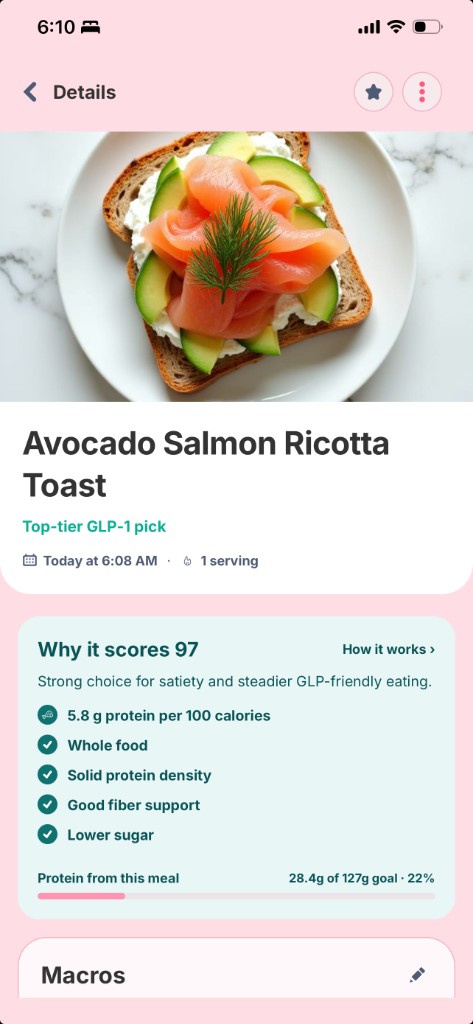
GLP AI meal entry with Meal Score feedback and protein progress
Example GLP AI meal entry. Screens may vary by app version and platform; nutrition estimates can be corrected.

Shotsy

Shot history, injection sites and progress charts

An Android option for shot records, injection sites, symptoms and progress, with nutrition logging also published. The key platform caveat is pills: Shotsy currently labels that feature iOS only. Do not assume an iPhone feature description applies to the Android app.

Before choosing: Check which reminders, charts and medication features are included in the free or paid offer on your platform.

Shotsy features and platform notes

Shotsy on Google Play →

MyFitnessPal

A familiar food diary and calorie tracking

A food-first Android option if you already have meals and recipes saved there. MyFitnessPal documents Health Connect support for Android. Keep a separate medication record if its food diary does not cover your dose, injection-site and symptom workflow.

Before choosing: Its free food diary is not a complete GLP-1 medication log. MyFitnessPal lists barcode scanning as a Premium feature.

MyFitnessPal Health Connect support

MyFitnessPal on Google Play →

Cronometer

Detailed nutrition records

A nutrition-focused choice for reviewing more than calories and protein. Cronometer documents an Android Health Connect integration. It can complement a medication tracker when detailed nutrient records are more important to you than keeping everything in one app.

Before choosing: A nutrition-focused app may still leave you needing a separate medication log.

Cronometer Health Connect integration

Cronometer on Google Play →

MyNetDiary

Food database and barcode logging with GLP-1 tools

Compare MyNetDiary if you want food search and barcode logging plus GLP-1 tools in the same product. Its official GLP-1 page lists Android and Wear OS. Medication tracking, Meal Scan and GLP-1 menus sit in Premium, so test the food diary first and review the upgrade offer.

Before choosing: Free food logging does not mean free medication tracking; check the Premium offer for the tools you need.

MyNetDiary GLP-1 and Android features

MyNetDiary on Google Play →
FREE VS. PAID

Which features are free on Android

If you want a free GLP-1 tracker for Android, start by deciding whether you need a medication log or a food diary. GLP AI and Shotsy publish free core tracking. MyFitnessPal and Cronometer offer free nutrition tracking; MyNetDiary offers free food logging while medication tracking requires Premium.

Published feature tiers · checked September 29, 2026
AppFree featuresPaid features or limits
GLP AIDose, symptom, weight and meal tracking; limited access to AI featuresFull AI coach, Meal Score and medication chart
ShotsyDose and side-effect tracking, weight charts and nutrition loggingAdditional premium tools; check the current offer on your platform
MyFitnessPalFood diary, calorie tracking and food databaseBarcode Scanner, Meal Scan and additional nutrition controls
CronometerBasic food and nutrition trackingGold adds features; check the current plan comparison
MyNetDiaryFood, barcode and protein trackingMedication tracking, Meal Scan and GLP-1 menus

Plans, features and regional offers can change. Use the current Google Play listing and in-app upgrade screen to confirm the price and renewal terms.

BEFORE DOWNLOADING

Check the fit on your phone

  1. 01

    Open the correct Google Play listing

    Use the Android links in this guide. Check device compatibility, the latest release notes and the Data safety section for your account and region.

  2. 02

    Test the Android workflow

    Log a meal, a symptom and a prescribed dose if the app supports it. For reminders, check notification permissions and that a test reminder arrives on your phone.

  3. 03

    Connect only the health data you need

    Review Health Connect permissions in the app and Android settings. Check whether the connection covers the data you want instead of assuming that all records sync.

  4. 04

    Verify the subscription and any transfer

    Review the Google Play billing period, renewal price and trial terms. If moving from an iPhone, confirm history transfer and subscription access before cancelling or buying another plan.

THE QUICK ANSWERS

Android app questions.

What is the best GLP-1 app for Android?+

GLP AI is an option for medication and food tracking together on Android, with Meal Score feedback and an AI coach. Compare Shotsy for shot records and charts, MyFitnessPal for a food diary, Cronometer for nutrient detail, and MyNetDiary for food logging with paid medication tools. The best fit depends on the logs and integrations you use.

Is there a free GLP-1 tracker app for Android?+

Yes. GLP AI and Shotsy publish free core tracking. GLP AI includes a limited try of its AI coach, Meal Score and medication chart; Premium unlocks the full versions. MyFitnessPal, Cronometer and MyNetDiary also have free nutrition features, but those are not the same as a free medication tracker.

Which Android apps work with Health Connect?+

GLP AI’s Android listing includes Health Connect for steps, sleep and active energy. MyFitnessPal and Cronometer also document Health Connect integrations. Supported data types and read or write permissions differ, so verify the records you need in each app.

Does Shotsy support pills on Android?+

Shotsy’s public feature page currently labels pill tracking as iOS only. Check its latest Android listing or support team before subscribing if oral medication tracking is essential.

Can I use MyFitnessPal or Cronometer while taking a GLP-1?+

You can use their Android food diaries to record nutrition while following your clinician’s guidance. They focus on nutrition; separately check for dose, injection-site and symptom records. MyFitnessPal lists barcode scanning as a Premium feature.

Will an iPhone subscription or history transfer to Android?+

Do not assume it will. Check the app’s account, export and subscription policies first. Confirm that your history is available on the Android app and whether an existing subscription carries over before starting a second subscription.

SOURCES & METHOD

How we made this comparison

GLP AI publishes this guide. We reviewed official product pages, support documentation and Google Play listings on September 29, 2026. The shortlist covers medication and nutrition workflows for Android; it is not a ranking of clinical effectiveness or a hands-on benchmark. Recommendations reflect published features, with limitations included for every app.

Start tracking on Android

Free covers tracking, with a limited try of the AI coach, Meal Score, and medication chart. Premium unlocks the full versions.

Get GLP AI on Google Play